


After testing ExpertOption on both demo and real accounts, it becomes clear that this platform is positioned slightly above basic binary options brokers. ExpertOption focuses on modern design, multiple account tiers, and social trading, making it appealing to both beginners and more active traders.
In this ExpertOption review 2026, we’ll analyze how the platform works, what features it offers, and whether ExpertOption is legit or a scam based on official regulation, platform structure, and real user experience
Quick Overview
| Feature | Details |
|---|---|
| Broker Name | ExpertOption |
| Broker Type | Binary Options |
| Founded | 2014 |
| Regulation | Member of The Financial Commission (FinaCom) |
| Minimum Deposit | From $10 |
| Tradable Assets | Forex, Stocks, Commodities, Indices, Crypto (Binary Options) |
| Trading Platform | Proprietary Web & Mobile Platform |
| Demo Account | Yes |
| Islamic Account | Yes |
| Social / Copy Trading | Yes |
| Mobile Trading | Yes (Android & iOS) |
| Supported Countries | Global (restrictions apply) |
- Modern and user-friendly trading platform
- Multiple account types for different trader levels
- Built-in social trading feature
- Islamic account type
- Low minimum deposit starting from $10
- Binary options only
- No MT4 or MT5 support
- Not regulated by Tier-1 authorities
- High risk for inexperienced traders
What Is ExpertOption?
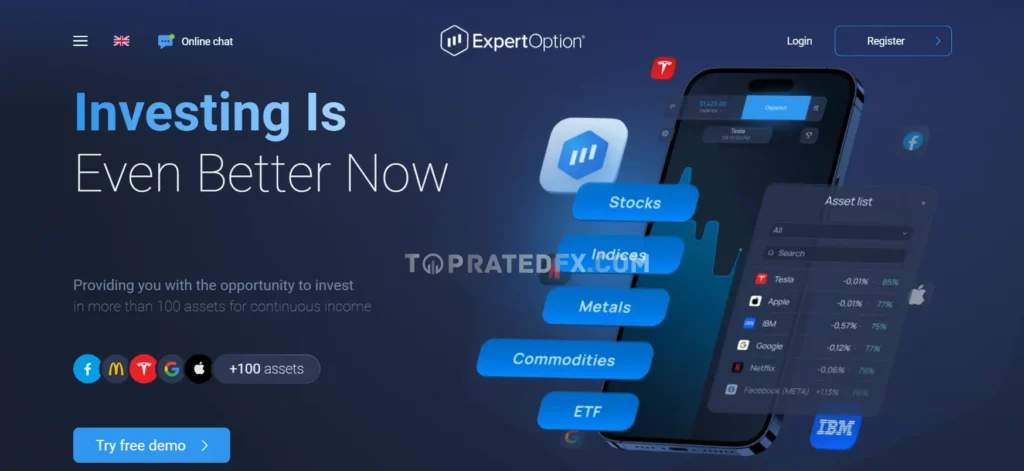
ExpertOption is an online trading platform specializing in binary options trading. Unlike very basic brokers, ExpertOption offers a more advanced environment with additional tools, account tiers, and community-based features.
Traders can speculate on the price movements of:
- Currency pairs
- Global stocks
- Commodities
- Market indices
- Cryptocurrencies
All trades are executed as fixed-time binary contracts, meaning profits and losses are predefined before the trade is placed.
Is ExpertOption Legit or a Scam?
Based on official documentation and platform testing, ExpertOption is legit, not a scam.
Why ExpertOption Is Considered Legit:
- It is a member of The Financial Commission (FinaCom)
- Offers dispute resolution and compensation mechanisms
- Has been operating since 2014
- Provides transparent demo and live trading environments
However, ExpertOption is not regulated by Tier-1 authorities such as the FCA or ASIC. This means traders should not expect the same level of regulatory protection found with major forex brokers.
ExpertOption Trading Platform
| Feature | Details |
|---|---|
| Platform Type | Proprietary Web Platform |
| Mobile App | Android & iOS |
| Supported Assets | Forex, Stocks, Commodities, Indices, Crypto |
| Trade Duration | From 1 minute |
| Chart Types | Line & Candlestick |
| Technical Indicators | Multiple built-in indicators |
| Order Execution | Instant |
| Demo Account | Yes (virtual funds) |
| Platform Customization | Limited |
| MT4 / MT5 | Not available |
ExpertOption uses a custom-built trading platform designed to balance simplicity and functionality. Compared to basic binary brokers, the interface feels more modern and responsive, especially for active traders.
The platform works directly in the browser and requires no downloads.
Platform Interface & Usability
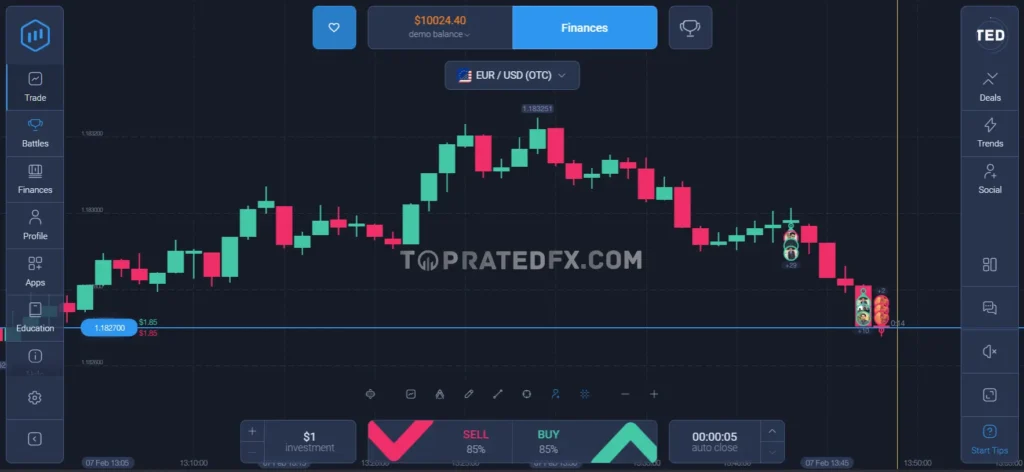
The interface is clean and intuitive, with all essential tools accessible from a single screen.
Interface Highlights
- Easy asset selection
- Clear trade amount and duration controls
- Fixed payout shown before trade entry
- Fast switching between demo and real accounts
This layout reduces mistakes and improves execution speed.
Mobile Trading Experience
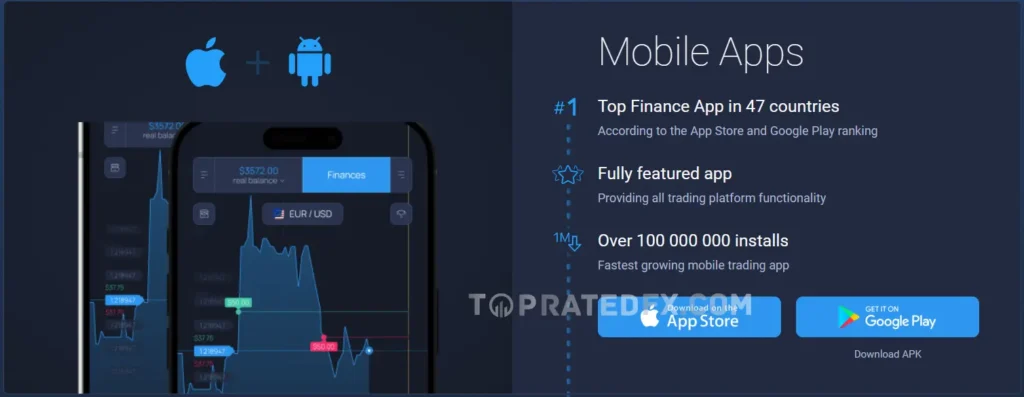
ExpertOption offers full-featured mobile apps for Android and iOS.
Mobile Platform Features
- Same trading tools as the web platform
- Smooth performance on mobile devices
- Quick deposits and withdrawals
- Ideal for on-the-go trading
The mobile app is one of ExpertOption’s strongest points.
Markets & Assets
ExpertOption provides a wide range of tradable instruments, all offered as binary options contracts.
Forex Trading
- Major currency pairs
- Minor currency pairs
Forex is the most popular market on ExpertOption due to stable liquidity.
Stocks Trading
- Popular global stocks
- Tech and blue-chip companies
Stock trading is speculative and does not involve real share ownership.
Commodities Trading
- Gold
- Silver
- Oil
Commodities Trading Note
Commodity binaries are sensitive to news and volatility, making them riskier for beginners.
Indices Trading
- Major global indices
- Market-wide exposure
Indices are often preferred for medium-term binary strategies.
Cryptocurrency Trading
- Bitcoin
- Ethereum
- Other major cryptocurrencies
Crypto Trading Risk
Crypto assets are highly volatile and should be traded with caution.
How Trading Works on ExpertOption
Trading on ExpertOption follows the classic binary options model.
Basic Trading Steps
- Choose an asset
- Select trade amount
- Set trade duration
- Predict price direction (Up or Down)
- Place the trade
The result is determined when the trade expires.
Account Types
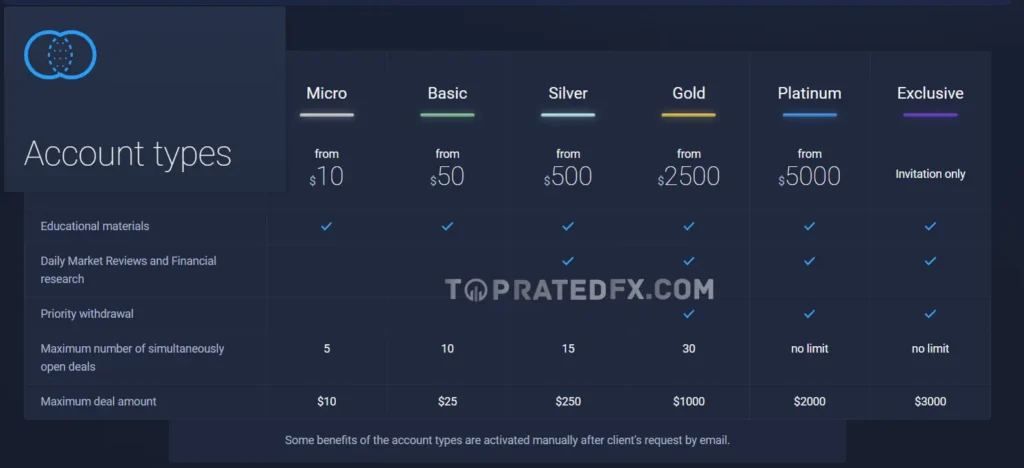
ExpertOption offers multiple account tiers designed to suit different trading levels, from beginners to high-volume traders.
Account Types Table
| Account Type | Micro | Basic | Silver | Gold | Platinum |
|---|---|---|---|---|---|
| Minimum Deposit | $10 | $50 | $250 | $1,000 | $5,000 |
| Trading Access | Limited | Standard | Expanded | Full | Full |
| Trading Signals | No | No | Yes | Yes | Yes |
| Personal Account Manager | No | No | Yes | Yes | Yes |
| Faster Withdrawals | No | No | Yes | Yes | Priority |
| Exclusive Features | No | No | Limited | Yes | Premium |
📌 Account requirements and benefits may vary by region.
Micro Account
The Micro account is designed for beginners who want to test the platform with minimal risk.
Micro Account Features
- Very low minimum deposit
- Basic platform access
- Suitable for learning binary options
Basic Account
The Basic account removes some limitations and is suitable for casual traders.
Basic Account Features
- More asset access
- Standard trading conditions
- No advanced features
Silver Account
The Silver account is aimed at more active traders.
Silver Account Benefits
- Access to trading signals
- Personal account support
- Faster withdrawals
Gold Account
The Gold account offers enhanced trading conditions.
Gold Account Advantages
- Priority withdrawals
- Advanced platform features
- Better trading support
Platinum Account
The Platinum account is designed for professional and high-volume traders.
Platinum Account Advantages
- Premium support
- Maximum trading access
- Fastest withdrawal processing
Islamic Account on ExpertOption
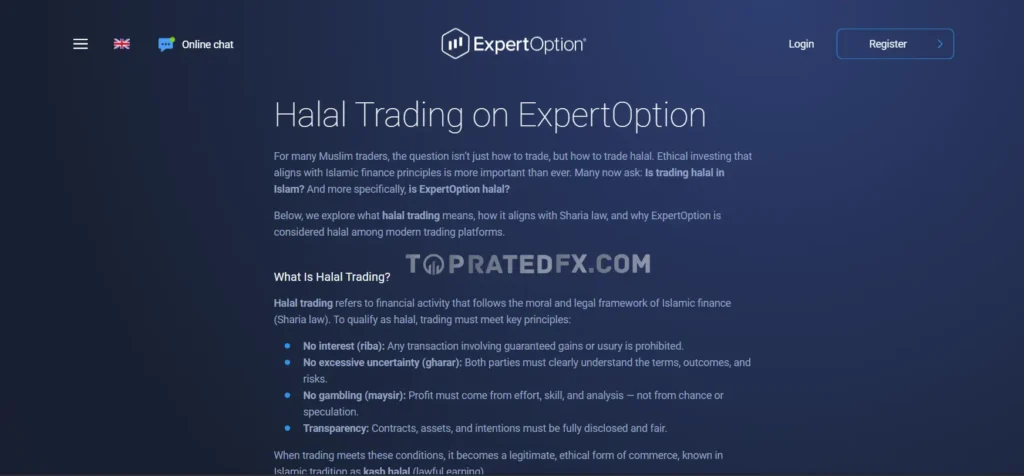
ExpertOption offers a dedicated Islamic account option designed for Muslim traders.
This account removes interest-based elements from trading activities, making it
more suitable for traders who follow Islamic finance principles.
The Islamic account can be activated directly from the trading platform and is
available to eligible users depending on their region.
ExpertOption provides a separate page explaining the Islamic account feature, which clearly demonstrates its intention to support halal trading preferences.
As with all trading platforms, users should manage risk carefully and consult
a qualified religious advisor if they have any concerns about compliance.
Minimum Deposit
ExpertOption keeps entry requirements relatively low.
Minimum Deposit Overview
| Payment Method | Minimum Deposit |
|---|---|
| Bank Cards | From $10 |
| E-Wallets | From $10 |
| Cryptocurrencies | Varies by network |
Minimum deposit amounts may differ by country.
Trading Fees & Costs
ExpertOption does not charge traditional trading commissions.
Fees Overview Table
| Fee Type | Cost |
|---|---|
| Trading Commission | None |
| Deposit Fees | Usually Free |
| Withdrawal Fees | May apply |
| Inactivity Fees | Not clearly specified |
How ExpertOption Charges Traders
- Costs are included in the payout structure
- Potential profit or loss is displayed before trade entry
Transparency Note
This structure helps traders understand risk before placing a trade.
Is ExpertOption Suitable for Small Accounts?
Yes. ExpertOption works well for small accounts because of:
- Low minimum deposit
- Fixed trade sizing
- Demo account availability
However, risk management remains essential due to the nature of binary options trading.
Deposit Methods
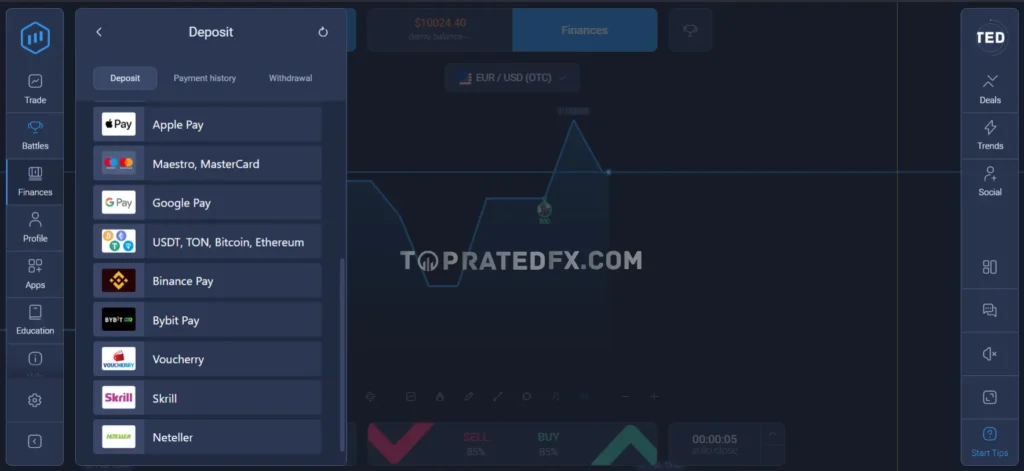
ExpertOption supports multiple deposit options to serve traders across different regions.
Overview Table
| Deposit Method | Processing Time | Fees |
|---|---|---|
| Credit / Debit Cards | Instant | Usually Free |
| E-Wallets | Instant | Usually Free |
| Cryptocurrencies | Network dependent | Network fees apply |
| Local Payment Methods | Instant | Varies by region |
Availability depends on the trader’s country.
Credit & Debit Cards
ExpertOption accepts major international cards.
Card Deposit Details
- Visa
- MasterCard
- Instant processing
- Minimum deposit usually starts from $10
E-Wallet Deposits
E-wallets are among the fastest and most convenient funding methods.
Supported E-Wallets
- Skrill
- Neteller
- Perfect Money
- WebMoney (availability may vary)
Deposits are typically credited instantly.
Cryptocurrency Deposits
ExpertOption allows funding accounts using cryptocurrencies.
Crypto Deposit Notes
- Bitcoin and other major cryptocurrencies are supported
- Processing depends on blockchain confirmations
- Network fees are not controlled by ExpertOption
Crypto deposits are popular in regions with limited banking options.
Withdrawal Methods
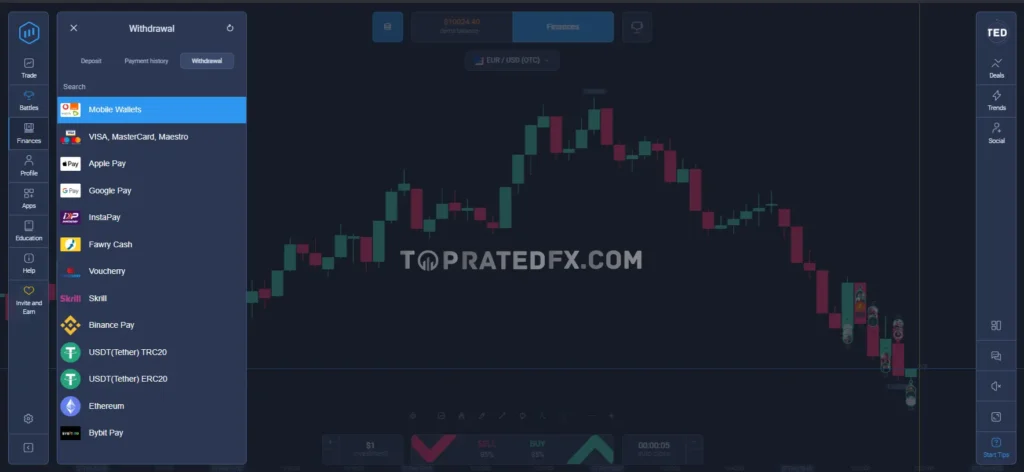
Withdrawals are generally processed using the same payment method used for deposit, where possible.
Overview Table
| Withdrawal Method | Processing Time | Notes |
|---|---|---|
| E-Wallets | 1–3 business days | Fastest option |
| Bank Cards | 3–7 business days | Bank dependent |
| Cryptocurrencies | Network dependent | Blockchain fees apply |
Withdrawal Processing & Verification
Before requesting a withdrawal, users must complete identity verification.
Required Verification Documents
- Government-issued ID
- Proof of address (utility bill or bank statement)
Verification usually takes 24–48 hours if the documents are clear.
Fees & Limits
Withdrawal conditions depend on account type and payment method.
Fees Summary
| Account Type | Withdrawal Fees |
|---|---|
| Micro / Basic | May apply |
| Silver | Reduced |
| Gold | Low or none |
| Platinum | No withdrawal fees |
Higher-tier accounts receive priority processing.
Common Deposit & Withdrawal Issues
While ExpertOption’s payment system is generally reliable, some users may face issues.
Common Problems
- Delayed verification
- Temporary payment method unavailability
- Withdrawal delays during peak periods
How to Avoid These Issues
- Complete verification early
- Use trusted e-wallets
- Ensure payment details are accurate
Real Withdrawal Experience
Based on platform testing and user feedback:
- E-wallet withdrawals are usually the fastest
- Card withdrawals are slower but consistent
- Crypto withdrawals depend heavily on network traffic
Overall, ExpertOption offers reliable payment processing, especially for verified users and higher-tier accounts.
Is ExpertOption Regulated?
Regulation is a key factor when evaluating any online trading platform.
ExpertOption is not regulated by Tier-1 authorities such as the FCA or ASIC.
However, it operates as a member of The Financial Commission (FinaCom).
Regulatory Status Overview Table
| Regulatory Factor | Status |
|---|---|
| Tier-1 Regulation (FCA, ASIC) | ❌ No |
| Independent Oversight | Financial Commission (FinaCom) |
| Dispute Resolution | Yes |
| Compensation Fund | Up to €20,000 (case-based) |
| Years in Operation | Since 2014 |
📌 Membership in FinaCom provides an additional layer of dispute handling, but it does not equal government-backed regulation.
What Does FinaCom Regulation Mean for Traders?
The Financial Commission is an independent organization that helps resolve disputes between traders and brokers.
Key Benefits of FinaCom Membership
- Neutral dispute resolution process
- Compensation fund for eligible claims
- Increased accountability for member brokers
Limitations Traders Should Know
- Not a government regulator
- Protection is more limited than Tier-1 regulators
- Compensation depends on commission decisions
Safety of Client Funds
ExpertOption applies several internal measures aimed at protecting client funds.
Fund Handling Practices
- Client funds are handled separately from company operational funds
- Secure payment processing systems
- Clear withdrawal rules based on account type
Fund Safety Overview
| Safety Measure | Available |
|---|---|
| Fund Segregation | Limited |
| Negative Balance Protection | Yes |
| Investor Compensation Scheme | Via FinaCom |
| Bank-Level Insurance | No |
Platform & Account Security
ExpertOption uses standard security technologies to protect user data and accounts.
Data Protection & Encryption
Security Technologies Used
- SSL encryption across the platform
- Encrypted payment transactions
- Secure server infrastructure
Account Security Features
Available Protections
- Password protection
- Email confirmation for withdrawals
- Manual monitoring for suspicious activity
Advanced security tools, such as mandatory two-factor authentication (2FA), are limited.
Risk Disclosure & Trading Warnings
ExpertOption clearly states that binary options trading involves high financial risk.
Risk Warning
- Binary options trading is speculative
- Losses can occur quickly
- Not suitable for risk-averse traders
Users are advised to trade responsibly and avoid using borrowed funds.
Is ExpertOption Safe for Beginners?
ExpertOption is technically safe in terms of platform reliability, but trading safety depends on user behavior.
Beginner Safety Considerations
- Use the demo account before real trading
- Start with small trade sizes
- Avoid emotional or over-leveraged trading
The platform is suitable for beginners only with strict risk management.
Customer Support
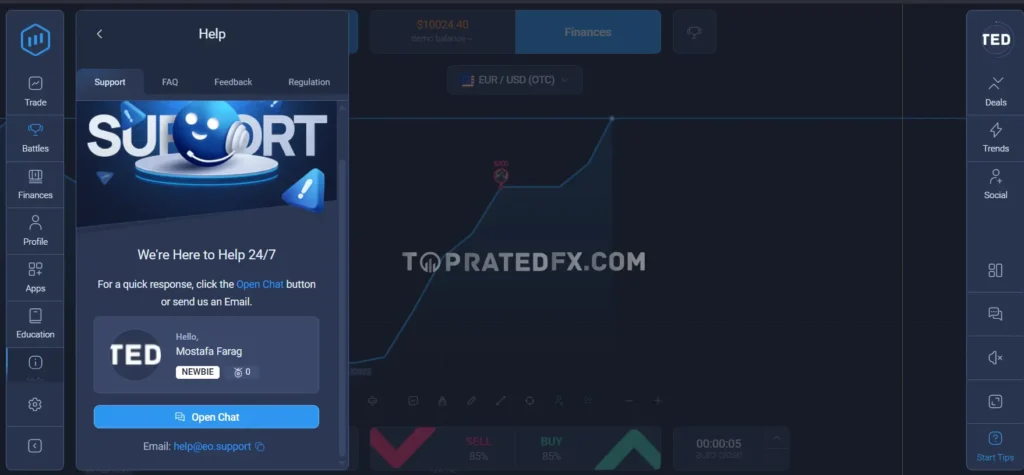
Reliable customer support is essential, especially for beginners. ExpertOption provides multiple support channels with decent availability.
Overview Table
| Support Channel | Availability | Typical Response |
|---|---|---|
| Live Chat | 24/7 | Fast |
| Email Support | 24/7 | Within 24 hours |
| Help Center | Always available | Self-service |
Live Chat Support
It is the fastest way to get help on ExpertOption.
Live Chat Experience
- Available 24/7
- Helpful for account, platform, and payment questions
- Responses are generally quick and clear
More complex issues may be redirected to email support.
Email Support
It is used for detailed issues such as verification or withdrawal problems.
Email Support Insights
- Typical response time: 12–24 hours
- Suitable for document verification and account-related issues
- Replies are usually structured and informative
Educational Resources
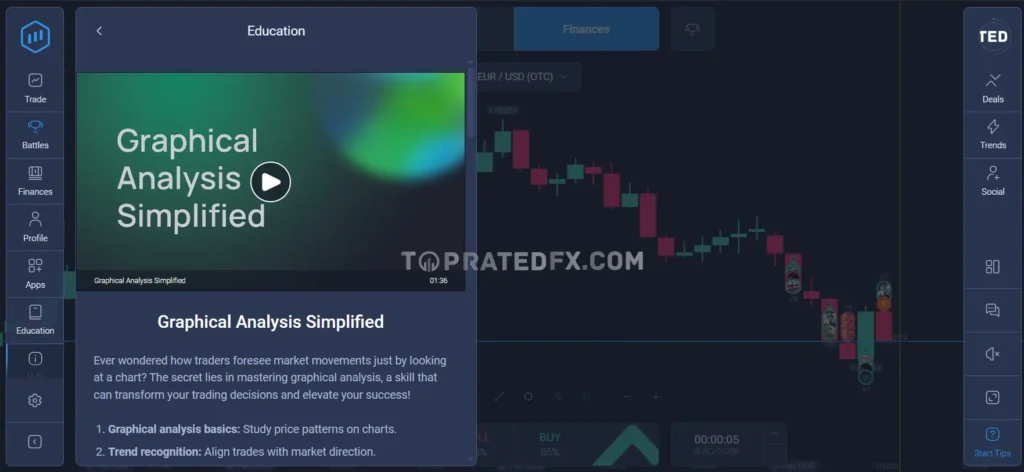
ExpertOption offers educational materials mainly designed for beginner traders.
Overview Table
| Resource Type | Available |
|---|---|
| Beginner Guides | Yes |
| Platform Tutorials | Yes |
| Strategy Articles | Basic |
| Video Lessons | Limited |
| Advanced Courses | No |
| Market Analysis | Limited |
Beginner Education
The education section focuses on:
- How binary options work
- Basic trading concepts
- Platform usage and navigation
This is enough for beginners, but not sufficient for advanced traders.
Social Trading & Learning from Other Traders
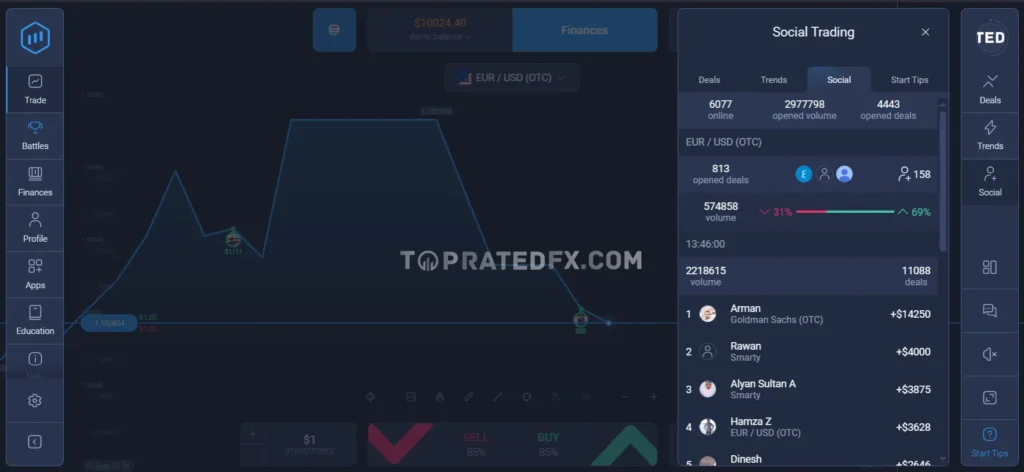
ExpertOption includes a built-in social trading feature, which also works as a learning tool.
How Social Trading Helps Beginners
- Observe top-performing traders
- Learn trade timing and asset selection
- Participate in community-based trading
Social trading is useful for learning, but it should not be treated as guaranteed profit.
Platform Usability & Interface
ExpertOption places strong emphasis on design and ease of use.
Web Platform Experience
- Modern and clean interface
- Fast order execution
- Easy switching between demo and real accounts
The platform feels more polished than many basic binary brokers.
Mobile Trading Experience
ExpertOption’s mobile apps offer full functionality.
Mobile App Highlights
- Smooth performance on Android and iOS
- Clear charts and indicators
- Easy access to deposits and withdrawals
Mobile trading is one of ExpertOption’s strongest areas.
Overall User Experience (UX Verdict)
ExpertOption delivers a balanced and user-friendly experience.
What ExpertOption Does Well
- Clean and modern platform design
- Responsive customer support
- Useful social trading feature
Where ExpertOption Can Improve
- More advanced educational content
- Stronger security features (e.g., wider 2FA use)
- Deeper market analysis tools
Is ExpertOption Beginner-Friendly?
Yes, ExpertOption is suitable for beginners with caution.
Beginner Verdict
- Easy to start
- Low learning curve
- Requires strict risk management
ExpertOption vs Competitors
To see where ExpertOption stands in 2026, it helps to compare it with other popular binary options platforms used by beginners and active traders.
Comparison Table
| Feature | ExpertOption | Binomo | IQ Option | Pocket Option |
|---|---|---|---|---|
| Broker Type | Binary Options | Binary Options | Binary & CFD | Binary Options |
| Founded | 2014 | 2014 | 2013 | 2017 |
| Regulation | FinaCom | FinaCom | CySEC (EU entity) | Offshore |
| Minimum Deposit | From $10 | From $10 | From $10 | From $5 |
| Trading Platform | Proprietary | Proprietary | Proprietary | Proprietary |
| Account Types | Micro → Platinum | Standard → VIP | Single tier | Single tier |
| Islamic Account | Yes | Yes | Yes | Yes |
| Social / Copy Trading | Yes | Yes | No | Limited |
| Demo Account | Yes | Yes | Yes | Yes |
| Mobile App | Yes | Yes | Yes | Yes |
| Best For | Beginners & active traders | Beginners | Beginners + CFDs | Bonus-focused traders |
Key Insights from the Comparison
Where ExpertOption Stands Out
- More account type flexibility than most competitors
- Built-in social trading for learning and copying
- Islamic account officially supported
- Modern platform design suitable for active traders
ExpertOption sits between beginner-only platforms and more advanced hybrid brokers.
Where Other Brokers May Be a Better Choice
- IQ Option is stronger for CFD traders who want more markets
- Pocket Option may appeal to users focused on bonuses
- Binomo is simpler for users who want the most basic experience
Who Should Choose ExpertOption?
ExpertOption is a good fit if you:
- Want more features than basic binary brokers
- Prefer structured account tiers
- Are interested in social trading
- Need an Islamic account option
Who Should Avoid ExpertOption?
ExpertOption may not be ideal if you:
- Want Tier-1 regulation
- Prefer MT4 or MT5 platforms
- Are you looking for long-term investing
- Need advanced professional trading tools
Final Verdict After Comparison
ExpertOption positions itself as a feature-rich binary options platform with better flexibility than entry-level brokers. While it does not offer Tier-1 regulation, it provides useful tools such as account tiers and social trading that many competitors lack.
For traders who want more control and features without moving to complex CFD platforms, ExpertOption remains a solid option in 2026.
Is ExpertOption Good for Beginners?
ExpertOption is considered beginner-friendly, but only when used with proper risk control.
The platform combines a simple interface with additional features like account tiers and social trading, which can help new traders learn faster.
Beginner-Friendly Features
- Low minimum deposit starting from $10
- Free demo account with virtual funds
- Clean and easy-to-use trading platform
- Built-in social trading for learning
- Mobile apps for trading anywhere
These features make it easy for beginners to start without a large upfront investment.
What Beginners Should Be Careful About
Binary options trading is high risk, regardless of the platform.
Common Beginner Mistakes
- Trading without demo practice
- Using large trade sizes too early
- Copying traders without checking performance history
- Overtrading after losses
Beginners should focus on learning, not quick profits.
Best ExpertOption Trading Strategies for Small Accounts
Simple strategies work best for beginners and small balances.
Strategy 1 – Demo-to-Real Transition
This strategy reduces emotional pressure.
How to Apply It
- Practice on the demo for at least 1–2 weeks
- Trade only one or two assets
- Use the same trade size when switching to real trading
Consistency is more important than profit at this stage.
Strategy 2 – Fixed Risk per Trade
This strategy helps protect small balances.
Key Rules
- Risk no more than 2–3% per trade
- Do not increase trade size after losses
- Stop trading after 2–3 consecutive losses
Strategy 3 – Using Social Trading Carefully
Social trading can be helpful if used correctly.
Best Practices
- Review trader performance over time, not one day
- Avoid copying traders with extremely high short-term gains
- Start with small amounts
Social trading is a learning tool, not a profit guarantee.
Risk Management Rules on ExpertOption
It is essential for long-term survival.
Risk Management Guidelines Table
| Rule | Recommendation |
|---|---|
| Risk per Trade | Max 2–3% |
| Daily Loss Limit | Stop after 5–10% |
| Demo Practice | Strongly recommended |
| Emotional Trading | Avoid |
Is ExpertOption Worth Using for Beginners in 2026?
ExpertOption can be useful for beginners if expectations are realistic.
Beginner Verdict
- ✅ Easy to start
- ✅ Helpful social trading feature
- ❌ High risk if misused
Beginners who focus on discipline and risk control can benefit from the platform’s tools.
FAQ
In this FAQ section, we answered the most common questions about ExpertOption, including legality, deposits, withdrawals, Islamic accounts, and social trading.
ExpertOption is a legitimate binary options trading platform that has been operating since 2014. It is a member of The Financial Commission (FinaCom), which provides dispute resolution and limited compensation coverage. However, it is not regulated by Tier-1 authorities.
The minimum deposit on ExpertOption starts from $10, making it accessible for beginners and small-account traders.
Yes. ExpertOption provides a free demo account with virtual funds. Traders can use it to practice strategies and learn the platform without risking real money.
Yes. ExpertOption offers an Islamic account designed for Muslim traders. This account removes interest-based elements and can be used as a halal trading option.
Yes. ExpertOption includes a built-in social trading feature that allows users to follow and copy trades from other traders directly inside the platform.
– E-wallet withdrawals: usually 1–3 business days
– Bank card withdrawals: 3–7 business days
– Cryptocurrency withdrawals: depend on blockchain confirmations
Account verification is required before withdrawals
ExpertOption does not charge direct trading commissions. Trading costs are included in the payout structure. Withdrawal fees may apply depending on the account type and payment method.
ExpertOption can be suitable for beginners due to its low minimum deposit, demo account, and social trading features. However, binary options trading is high risk, and beginners should use strict risk management.
ExpertOption is available in many countries globally, but some regions are restricted due to local regulations. Availability depends on the user’s location.
Final Verdict
Is ExpertOption Worth Using in 2026?
After reviewing all aspects of ExpertOption, the platform clearly positions itself as a feature-rich binary options broker rather than a basic entry-level option.
ExpertOption stands out for:
- Multiple account types
- Built-in social trading
- Official Islamic account support
- Modern and user-friendly platform
However, it remains a high-risk trading environment and does not offer Tier-1 regulatory protection.
Who Should Use ExpertOption?
ExpertOption is a good choice if you:
- Want more features than basic binary options platforms
- Prefer structured account tiers
- Are interested in social or copy trading
- Need an Islamic account option
- Trade with small to medium capital
Who Should Avoid ExpertOption?
ExpertOption may not be suitable if you:
- Prefer Tier-1 regulated brokers
- Want MT4 or MT5 platforms
- Are you looking for long-term investing
- Need advanced professional trading tools
Conclusion
ExpertOption is a legitimate and well-designed binary options platform that offers more flexibility and features than many competitors. Its social trading and Islamic account options make it especially appealing to a wider audience.
That said, trading on ExpertOption requires discipline, risk management, and realistic expectations. It is not suitable for traders seeking low-risk or long-term investment opportunities.
ExpertOption Details