


IQ Option is one of the most widely recognized online trading platforms among retail traders, especially beginners entering the world of online trading. Since its launch, the platform has gained popularity due to its low minimum deposit, modern trading interface, and free demo account, making it accessible to users with limited capital and little prior experience.
In this in-depth IQ Option review (2026), I will analyze the platform from a practical, experience-based perspective, not from a promotional angle. The goal is to answer the most important questions traders usually ask before signing up, such as:
- Is IQ Option legit or a scam?
- Is IQ Option safe for beginners?
- What can you really trade on IQ Option?
- Are deposits and withdrawals reliable?
This review is written for beginners, general traders, and small-account users who want a clear and honest assessment before risking real money. While professional traders may find some limitations, IQ Option positions itself primarily as a beginner-friendly broker rather than a high-end institutional trading solution.
Throughout this article, you’ll find a detailed breakdown of IQ Option trading, including account types, available assets (Forex, Crypto, Stocks, CFDs, and Binary Options where legally allowed), platform performance, fees, and real-world user experience. I’ll also explain how to use IQ Option step by step, highlight common mistakes beginners make, and clarify whether the platform is suitable for long-term use or only for learning and short-term trading.
⚠️ Important Notice:
This content is not intended for users in the European Union or EEA countries, where binary options trading is prohibited. Trading involves significant risk, and this review does not constitute financial or investment advice.
By the end of this IQ Option review, you will have a clear, realistic understanding of what the platform offers, who it is best suited for, and whether opening an account makes sense for your trading goals in 2026.
- User-friendly platform
- Free demo account
- Low minimum deposit
- Excellent mobile app
- Multiple asset classes
- Built-in educational tools
- Fast execution
- Not regulated by top-tier global authorities
- Not ideal for professionals
- Binary options restricted in EU/EEA
- Limited leverage transparency
- Risk of overtrading for beginners
- Fees vary by asset/region
What Is IQ Option?
IQ Option is an online trading platform designed primarily for retail traders, with a strong focus on accessibility, simplicity, and low entry barriers. The platform was launched in 2013 and quickly gained attention by offering a modern, user-friendly interface at a time when most brokers relied on complex and outdated trading software.
Unlike traditional Forex brokers that mainly target experienced traders, IQ Option positions itself as a multi-asset trading platform for beginners and small-account traders, while still offering enough tools to satisfy intermediate users.
Company Background and History
IQ Option started as a platform focused mainly on binary options, which helped it grow rapidly due to the simplicity of that trading model. Over time, and especially after regulatory changes in Europe, the platform expanded its offering to include a broader range of instruments, such as:
- Forex (currency pairs)
- Cryptocurrencies (via CFDs)
- Stocks and ETFs (CFDs)
- Indices and commodities
- Digital and binary options (only where legally allowed)
This shift transformed IQ Option from a single-product platform into a multi-asset broker, making it more competitive with other retail trading platforms.
Where Does IQ Option Operate?
IQ Option operates internationally through different legal entities, depending on the user’s country of residence.
- European Union & EEA:
Binary options are prohibited, and access to certain products is restricted. - Non-EU / Non-EEA countries:
Traders may access a wider range of instruments, including binary options, depending on local regulations.
Important note: This review and content are not intended for users in EU or EEA countries, especially regarding binary options trading.
Who Is IQ Option Designed For?
IQ Option is best suited for:
- Beginners who want to learn trading step by step
- Traders with small starting capital
- Users who prefer trading via mobile apps
- People looking for a demo/practice account before trading real money
It is less suitable for:
- Professional or institutional traders
- Traders managing large portfolios
- Users who require advanced platforms like MT4 or MT5 with deep market access
How IQ Option Differs from Traditional Brokers
What makes IQ Option different is that it uses a proprietary trading platform, not MetaTrader. This has both advantages and limitations:
Key differences include:
- A simplified interface instead of complex professional tools
- Built-in educational elements and visual indicators
- Faster onboarding for new traders
- Fewer advanced features for algorithmic or institutional trading
In practice, IQ Option acts more like a learning-oriented trading environment rather than a full-scale professional brokerage solution.
In simple terms, IQ Option is a retail-focused online trading platform that prioritizes ease of use, affordability, and accessibility. It is designed to help new traders enter the market with minimal capital while offering exposure to multiple asset classes.
However, this ease of use also means that traders must be especially careful with risk management, as the platform sometimes makes trading feel more accessible than the risks involved.
Is IQ Option Legit and Safe?
One of the most common questions traders ask before opening an account is: “Is IQ Option legit or a scam?”
In this section, we’ll examine IQ Option’s regulation, safety measures, and real-world credibility to give you a clear, honest answer.
Is IQ Option Legit?
Yes, IQ Option is a legitimate online trading platform, not a scam. Millions of users have traded on the platform since its launch, and the company has built a strong brand presence in many global markets. Users are genuinely able to deposit funds, execute trades, and withdraw profits when they meet the platform’s requirements.
However, legitimacy doesn’t mean perfection. It’s important to understand the scope, limitations, and regulatory environment under which IQ Option operates.
Regulation: What You Need to Know
Regulation is crucial when assessing safety. A regulated broker must follow rules that protect traders and ensure transparency.
Regulatory Status of IQ Option
- IQ Option is regulated in certain jurisdictions outside the European Union.
- In the EU & EEA, binary options and similar products are restricted or banned, and IQ Option complies with those rules.
- IQ Option has had licenses from regulators like the Cyprus Securities and Exchange Commission (CySEC) in the past, but conditions and entity structures change with regulatory policy.
- In other regions, IQ Option may operate under specific local entities compliant with local regulations.
⚠️ Important: Regulation is not uniform globally. This means that protection levels vary depending on where you live. Traders from different countries may access different products and levels of legal protection.
Client Fund Safety
Here’s how IQ Option works to keep your funds protected:
- Segregated accounts: Client funds are kept separate from company operating funds.
- Encryption security: The platform uses SSL and advanced encryption to protect data.
- KYC & AML procedures: Identity verification is required before withdrawals, ensuring compliance and reducing fraud risk.
This setup doesn’t reach the same level of protection you might see with large Tier-1 banks or brokers regulated in the U.S., UK, or Australia, but it does reduce several common risks.
What IQ Option Is Not
To remain balanced, it is important to understand what IQ Option is not:
❌ It is not a bank or a deposit-taking institution.
❌ It does not guarantee returns or investment profits.
❌ It is not regulated by top-tier authorities like the FCA (UK), ASIC (Australia), or SEC (United States).
❌ In the EU and EEA, binary options are restricted or banned, and this affects how the product is offered.
Safety Features in Practice
Below is a snapshot of key safety features you’ll find on IQ Option:
| Safety Feature | Purpose |
|---|---|
| SSL Encryption | Protects login and data transfers |
| Two-Factor Authentication (2FA) | Adds account security |
| Segregated Client Funds | Reduces misuse of client deposits |
| KYC Verification | Prevents fraud and money laundering |
| Risk Warnings | Reminds traders of potential losses |
These features show a clear commitment to operational security and responsible trading, especially compared to unregulated brokers that provide few if any safeguards.
Real-World User Trust & Feedback
While many users report smooth deposits, fast execution, and trouble-free withdrawals when all conditions are met, some common complaints deserve attention:
🔹 Delay in withdrawals due to incomplete KYC
🔹 Misunderstanding of product risk (especially binary options)
🔹 Clarity issues around fees or overnight charges
These are typical in online trading but emphasize the need for educated, disciplined trading.
Final Verdict: Is IQ Option Safe?
Yes, IQ Option is a legitimate platform, but safety depends heavily on your location, product type, and risk management.
✔️ Legitimate and widely used
✔️ Real money can be deposited and withdrawn
✔️ Safety protocols are in place
⚠️ However:
- Regulation varies by region
- Not regulated by top-tier global authorities
- Binary options are restricted or banned in many countries
IQ Option Account Types Explained
Understanding the available account types is essential before you start trading with IQ Option. One of the platform’s strongest points is its simple account structure, which avoids unnecessary complexity and makes it easier for beginners to get started.
Unlike many traditional Forex brokers that offer multiple account tiers with confusing conditions, IQ Option focuses on three practical account categories, each serving a clear purpose.
IQ Option Demo Account (Practice Account)
The IQ Option demo account is one of the best features of the platform, especially for beginners.
Key characteristics:
- Free and available immediately after sign-up
- Comes with virtual funds (practice balance)
- Access to almost all trading instruments and tools
- No time limit or forced upgrade
Why it matters:
The demo account allows users to:
- Learn how to use IQ Option step by step
- Test trading strategies without financial risk
- Understand platform mechanics before real trading
From practical experience, this demo environment closely mirrors real-market conditions in terms of pricing and execution, making it a reliable learning tool.
Best for:
- Beginners
- Strategy testing
- Risk-free learning
IQ Option Real Trading Account (Standard Account)
Once you switch from demo to real trading, you’ll be using the standard real account.
Key characteristics:
- Low minimum deposit (usually starting from $10, depending on the country)
- Access to all available assets in your region
- Same platform features as the demo account
- Real profits and real losses
There are no complicated account tiers for most users. Instead, your experience depends more on position size, risk management, and the assets you trade than on the account label itself.
Important notes from experience:
- Small accounts are very sensitive to risk
- Overtrading is the most common beginner mistake
- Proper position sizing is critical
Best for:
- Beginners transitioning from demo to live trading
- Traders with small starting capital
- Casual and part-time traders
IQ Option VIP Account (If Available)
IQ Option may offer a VIP account to traders who deposit larger amounts or meet specific volume requirements. such as:
Deposit $600 or more and have a trading volume of $6,000 in the last 60 days.
To keep the VIP status, you must deposit $300 or maintain a trading volume of $3,000 every 90 days.
Exclusive perk:
All VIP members are assigned a dedicated account manager.
Typical VIP benefits may include:
- Priority customer support
- Exclusive trading conditions or promotions
- Access to special tournaments or features
However, based on practical use and user feedback, VIP status does not dramatically change trading performance. The core platform, execution, and asset access remain largely the same.
Is VIP worth it?
For most beginners and general traders, no. The standard account already provides full functionality. VIP status may only be useful for high-volume traders who value priority support. VIP status holders receive an increased payout percentage on select assets, typically ranging from +3% to +5% on the most popular currency pairs of the day.
Remember, VIP status isn’t permanent and requires upkeep. To retain it, you must make deposits totaling $300 over the 90 days following the attainment of VIP status. If successful, your status will be extended; otherwise, your account will revert to “Standard”.
Quick Comparison of IQ Option Account Types
| Account Type | Minimum Deposit | Risk Level | Recommended For |
|---|---|---|---|
| Demo Account | $0 | None | Beginners, practice |
| Real Account | From $10 | High | Small-account traders |
| VIP Account | $600 or more | High | High-volume traders |
IQ Option Islamic Account (Swap-Free Account)
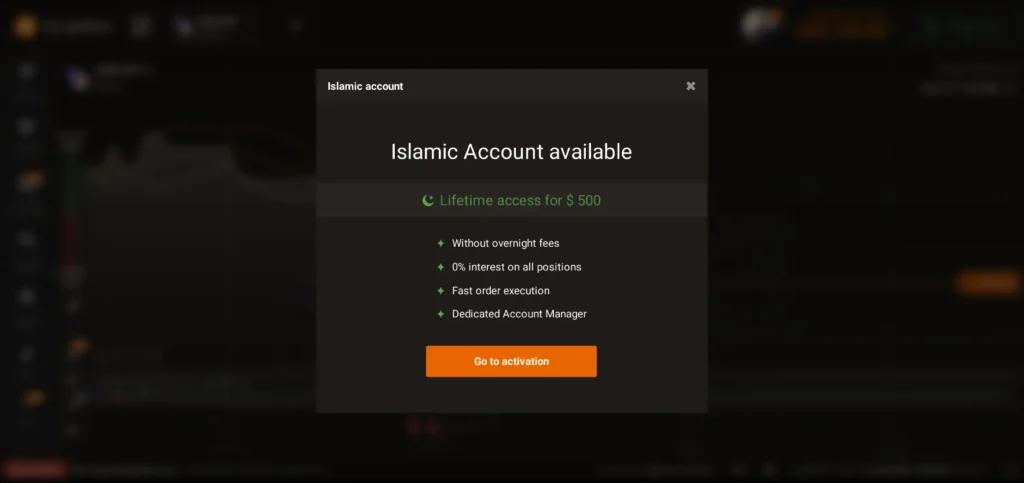
A dedicated Islamic account option designed for traders who require Sharia-compliant trading conditions. This account removes all forms of interest (riba) and overnight swap fees, making it suitable for Muslim traders who want to trade without violating Islamic finance principles.
Islamic Account Features:
- Lifetime access for $500 (one-time payment)
- No overnight fees (swap-free trading)
- 0% interest on all open positions
- Fast order execution
- Dedicated Account Manager
- Full access to the trading platform and assets
Unlike many brokers that offer Islamic accounts for free, IQ Option provides it as a premium upgrade, meaning:
- It is not enabled by default
- It must be activated manually
- It requires a paid lifetime upgrade
Important Transparency Notes:
- The Islamic account removes swap/interest fees, but trading risk remains
- Spreads and trading costs still apply
- Not all assets may be considered halal by all scholars (especially CFDs and derivatives)
- Sharia compliance interpretation may vary by scholar and region
Best for:
- Muslim traders seeking swap-free trading
- Long-term traders who hold positions overnight
- Traders who want interest-free conditions
Not ideal for:
- Very small accounts (due to $500 activation fee)
- Casual demo-only users
- Short-term scalpers who don’t hold overnight positions
⚠️ Religious Disclaimer:
While IQ Option provides a swap-free Islamic account, whether trading on the platform is fully halal depends on the asset type, contract structure, leverage, and personal interpretation of Sharia law. Traders should consult a qualified Islamic finance scholar for personal guidance.
Key Takeaway on Account Types
IQ Option keeps things intentionally simple, which is a major advantage for beginners. The demo-to-real transition is smooth, and there are no hidden account upgrades required to access core features.
That said, simplicity also means less customization for advanced traders. If you’re managing a large portfolio or need institutional-grade account conditions, IQ Option may feel limited.
IQ Option Minimum Deposit & Account Limits
Understanding the minimum deposit requirements and trading limits is essential before you start trading on IQ Option. These factors determine how accessible the platform is, especially for beginners, small-account traders, and casual users.
This section breaks down real-world numbers and practical tips so you know exactly what to expect when you open your account.
IQ Option Minimum Deposit
One of IQ Option’s biggest attractions is its low entry cost.
- Minimum deposit: Typically from $10 (or equivalent in local currency)
- Currency options: USD, EUR, GBP, and several others, depending on your country
- Method flexibility: You can deposit via cards, e-wallets, and sometimes crypto (availability varies)
This low minimum deposit makes IQ Option particularly attractive for:
- People who want to learn trading with minimal risk
- Traders who want to experiment with live market conditions
- Students or part-time traders with limited capital
Note: The minimum deposit may vary slightly depending on your country of residence and the deposit method you choose.
Minimum Trade Size
IQ Option also allows you to make smaller trades once your account is funded.
- Minimum trade size: Often as low as $1 per trade (varies with asset type and region)
- This low threshold allows beginners to practice real trading with small risk
Example:
If you deposit $10, you could potentially place 10 trades of $1 each, giving you practical exposure with limited downside.
This structure supports responsible trading if you use proper risk management.
Leverage Overview
Leverage lets you control a larger position with a smaller amount of capital, but it also multiplies both gains and losses.
At IQ Option:
- Leverage varies based on your country and the asset you trade
- Forex pairs usually have higher leverage than stocks or crypto
- In many jurisdictions, leverage is capped by regulatory standards for retail traders
Important: Higher leverage increases the risk of rapid losses, especially for beginners.
Trading Hours and Market Access
IQ Option enables trading across multiple markets, but access depends on:
- Asset type
- Market opening hours
- Regional regulations
Example:
- Forex and crypto markets are typically available 24/5 or 24/7
- Stocks and indices depend on local exchange hours
Understanding market hours helps you plan your trading strategy and avoid entering trades when liquidity is thin.
Margin and Risk Limits
Margin levels and risk controls exist to protect both traders and the platform.
- If your margin ratio falls too low during leveraged trades, positions may be automatically closed (margin call)
- IQ Option doesn’t publicly publish full margin tables like some Forex brokers, but it enforces risk limits based on:
- Account balance
- Asset volatility
- Position size
For beginners, this means:
- You should always check the margin requirement before placing a leveraged trade
- Overleveraging can lead to fast account depletion
Practical Tips for New Traders
If you’re just starting, keep these tips in mind:
✅ Start with the demo account to learn the platform
✅ Use the low minimum deposit to test your strategy on a real account
✅ Keep trade sizes small (e.g., $1–$5 per trade)
✅ Avoid high leverage until you fully understand it
✅ Treat IQ Option as a learning and execution platform, not a guaranteed profit machine
Quick Recap
| Feature | Value |
|---|---|
| Minimum Deposit | From $10 |
| Minimum Trade Size | From $1 |
| Leverage | Varies by asset and region |
| Market Hours | Depends on the market |
| Margin & Risk Limits | Dynamic based on asset and account |
Understanding these minimums and limits before you sign up helps you trade more responsibly and avoid common beginner pitfalls. In the next section, we’ll explore the assets you can trade on IQ Option, including Forex, Crypto, Stocks, Indices, and more.
Tradable Assets on IQ Option
One of the strengths of IQ Option is the range of tradable assets it offers. While the platform began mainly as a binary options provider, it has expanded to include a variety of markets that appeal to traders with different goals and risk appetites.
Below is a clear, practical breakdown of the main tradable assets you’ll encounter on IQ Option, what they are, how they work, and what beginners should know.
1. Forex (Currency Pairs)
Forex trading on IQ Option allows you to trade one currency against another with the expectation that the exchange rate will move in your favor.
Key Features
- Major pairs (e.g., EUR/USD, GBP/USD)
- Minor and exotic pairs
- Variable spreads
- Leverage available (varies by region)
Practical Notes
- Forex trading is highly liquid and suitable for both short-term and long-term strategies.
- Leverage can magnify both profits and losses, especially for beginners to manage carefully.
2. Cryptocurrencies
IQ Option offers a selection of cryptocurrency instruments, typically as CFDs rather than owning the underlying asset.
Common Crypto Assets
- Bitcoin (BTC)
- Ethereum (ETH)
- Litecoin (LTC)
- Ripple (XRP)
- And more (availability varies by country)
Practical Notes
- Crypto trading is available most hours of the day, often 24/7.
- Volatility can be higher than in other markets, which means greater opportunities and higher risk.
3. Stocks & ETFs
With IQ Option, you can trade stock CFDs from major global exchanges.
What’s Available
- Apple (AAPL)
- Tesla (TSLA)
- Google (GOOGL)
- Amazon (AMZN)
- Select ETFs
Practical Notes
- You’re trading price movements, not owning the shares.
- Trading hours are aligned with the relevant stock exchange’s session.
4. Indices
Indices represent the performance of a group of stocks (e.g., S&P 500, Dow Jones, DAX).
Why Trade Indices?
- Diversification across a market segment
- Reaction to macroeconomic events
- Lower volatility than individual stocks (often)
5. Commodities
IQ Option offers commodities such as:
- Gold
- Oil
- Silver
- Natural gas (availability varies)
Practical Notes
- Commodities can act as inflation hedges or safe-haven trades.
- Trading often depends on global news and macroeconomic data.
6. Binary Options (Non-EU/EEA Only)
Important: Binary options trading via IQ Option is not available to users in the European Union or EEA due to local regulatory restrictions.
What Binary Options Are
Binary options allow traders to predict whether an asset’s price will be above or below a certain level at a specific time.
- Fixed payout and risk
- Short-duration trades possible (e.g., 1–5 minutes)
Risks
- High risk due to all-or-nothing payoff
- Not ideal for total beginners without strong risk control
How Asset Availability Varies by Region
Depending on where you live and local laws, you may see different tradable assets:
| Region | Forex | Crypto | Stocks | Indices | Commodities | Binary Options |
|---|---|---|---|---|---|---|
| EU/EEA | ✔️ | ✔️ | ✔️ | ✔️ | ✔️ | ❌ |
| Non-EU | ✔️ | ✔️ | ✔️ | ✔️ | ✔️ | ✔️ or Restricted |
Practical Tips for Beginners
- Start with Forex or Demo Crypto Trading: Lower learning curve than binary options.
- Use the Demo Account First: Practice trading different assets with no risk.
- Understand Market Hours: Stocks and indices follow specific exchange hours.
- Manage Risk: Especially in high-volatility markets like crypto.
Summary
IQ Option offers a wide range of tradable assets that can satisfy many types of traders, from those seeking broad exposure (like indices and stocks) to those looking for highly liquid markets like forex and crypto. However, what you can trade depends on your region, and certain products like binary options are restricted in the EU/EEA.
Understanding each asset type, its risks, and how it fits your strategy is key to trading smarter and protecting your capital.
IQ Option Trading Platform Review
The trading platform is arguably the heart of any online broker, and for many traders, it’s the most important factor when choosing where to trade. In the case of IQ Option, the platform is one of the strongest reasons beginners and casual traders sign up.
Below is a practical, experience-based review of the IQ Option trading environment from the web platform to mobile apps and execution quality.
Web Trading Platform
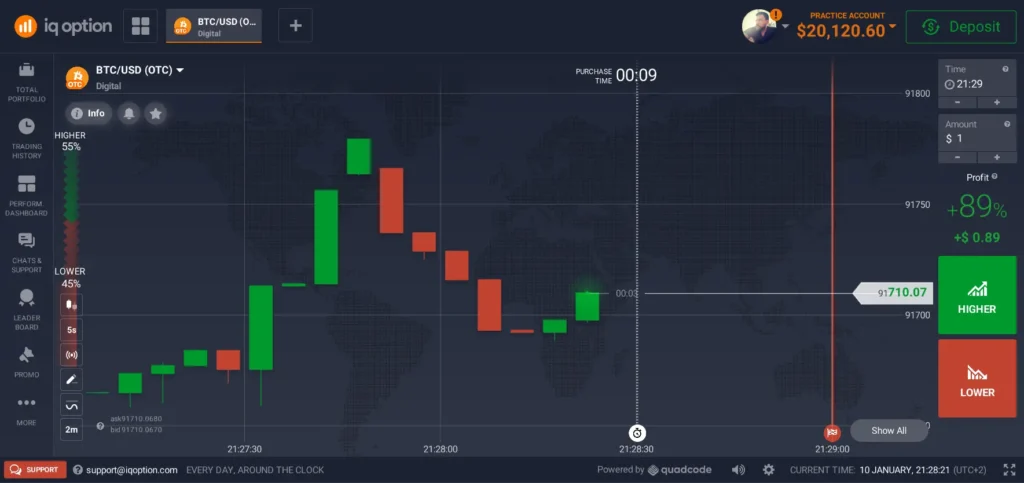
The web platform is the core of the IQ Option experience, and it is accessible directly through modern browsers on desktop or laptop without downloads.
User Interface (UI) & Layout
- Clean, intuitive interface with minimal clutter
- Trading panels, charting tools, and order entries are logically placed
- Colour coding and icon design improve usability even for new traders
This simplicity is intentional, making it easy for beginners to navigate without feeling overwhelmed.
Charting Tools & Technical Indicators
IQ Option provides a decent selection of charting tools:
- Multiple time frames (from ticks to daily)
- Trend and oscillator indicators (e.g., RSI, MACD, EMA)
- Drawing tools (trendlines, support/resistance)
While not as advanced as MetaTrader 5, the tools are sufficient for most beginner to intermediate strategies, especially if you focus on price action or basic trend analysis.
Order Types & Execution
The platform supports standard order types:
- Market orders
- Limit and stop orders
- Take profit & stop-loss settings
Execution quality tends to be fast, with most trades filled quickly in liquid markets like major Forex pairs. Slippage can occur during major news events (as with most brokers), but for standard conditions, execution is reliable.
User Experience (Web)
From hands-on experience:
✔️ Speedy navigation
✔️ Easy asset selection
✔️ Information pop-ups and tips for beginners
✔️ Real-time data feeds
Limitations:
- Chart customization is less advanced than MetaTrader platforms
- No automated trading or expert advisor support (EA)
IQ Option Mobile App
The mobile app is a major strength of this broker, especially in an era where many traders rely on phones.
App Platforms
- Android app: downloadable via official stores
- iOS app: available on Apple App Store
- Almost full parity with the web platform
Mobile Usability
The app delivers:
- Smooth navigation with touch gestures
- Easy asset switching
- Quick order placement
- Integrated charts with indicators
- Notification alerts for prices
From real use, the app feels polished and stable, even when markets are busy.
Pros:
- Excellent for on-the-go trading
- Quick trade entries/exits
- Responsive and lightweight
Cons:
- Charting tools are slightly limited compared to the web
- Harder to do in-depth analysis on small screens
Execution Speed and Stability
Across both web and mobile:
- Trade execution is generally fast
- Platform uptime is high
- Minimal lag in normal market conditions
During high volatility (e.g., major news), execution times may slow, and spreads can widen, but this is common across nearly all online brokers.
Platform Features for Beginners
IQ Option includes several features that help new traders get comfortable:
✔️ Demo/Practice switching in one click
✔️ Asset search and favorites
✔️ Learning tips and mini guides inside the platform
✔️ Order confirmation prompts
These features reduce the learning curve and protect inexperienced traders from accidental trades.
Missing Features Compared to Professional Platforms
While the platform is excellent for its target market, it isn’t without limitations:
❌ No MetaTrader 4 or 5 support
❌ Limited algorithmic or automated trading
❌ Charting is not as advanced as professional platforms
❌ Fewer risk-management tools than institutional-grade solutions
This means that while IQ Option is very good for beginners and casual traders, serious professionals may find it lacking.
Real User Perspective
From actual experience:
- New users adapt to the interface within minutes
- Demo account makes learning painless
- The mobile app is reliable for everyday trading
- Execution quality is solid for standard market conditions
However:
- Traders craving advanced tools or deep technical analysis may need supplemental platforms or software.
Summary: IQ Option Trading Platform
| Feature | Rating (out of 5) |
|---|---|
| Ease of Use | ⭐⭐⭐⭐⭐ |
| Charting Tools | ⭐⭐⭐⭐☆ |
| Mobile App | ⭐⭐⭐⭐⭐ |
| Trade Execution | ⭐⭐⭐⭐☆ |
| Advanced Features | ⭐⭐⭐☆☆ |
Overall: A very accessible and user-friendly trading platform that is ideal for beginners and intermediate traders, especially those who prefer simplicity and quick access over complex professional tools.
How to Use IQ Option – Step by Step
This section is designed as a practical walkthrough for beginners who want to understand how to use IQ Option step by step, from creating an account to placing the first trade and managing risk. The explanation below is based on real platform usage, not theory.
Step 1: IQ Option Sign Up (Account Creation)
Getting started with IQ Option sign-up is straightforward and takes only a few minutes.
Steps:
- Visit the official IQ Option website
- Click Sign Up
- Enter your email address and create a password
- Choose your account currency
- Accept the terms and conditions
You can start immediately with a demo account after registration, no deposit or verification required at this stage.
Important tip:
Use a real email address you control. You’ll need it later for verification and withdrawals.
Step 2: Switch Between Demo and Real Account
One of IQ Option’s best features is the ability to switch instantly between a demo and a real account.
- Demo account = virtual money (practice only)
- Real account = real funds, real profits/losses
You can switch anytime with one click from the account balance menu.
Best practice for beginners:
- Spend time on the IQ Option demo account
- Test strategies and understand price movements
- Only move to real trading when you are consistent on demo
Step 3: Complete Identity Verification (KYC)
Before making a withdrawal, IQ Option requires identity verification.
Typically required:
- Government-issued ID
- Proof of address (sometimes)
- Payment method verification
This is a standard security process and helps prevent fraud.
⚠️ Most withdrawal delays happen because users skip or delay verification.
Step 4: Make Your First Deposit
To start real trading, you’ll need to fund your account.
IQ Option deposit basics:
- Minimum deposit: usually from $10
- Supported methods: cards, e-wallets, sometimes crypto
- Deposits are often instant
Choose a deposit amount you can afford to lose, especially as a beginner.
Beginner advice:
Start with the minimum deposit and small trade sizes.
Step 5: Choose an Asset to Trade
IQ Option offers multiple asset classes depending on your region:
- Forex pairs
- Cryptocurrencies
- Stocks (CFDs)
- Indices and commodities
- Binary options (non-EU/EEA only)
Beginner-friendly assets:
- Major Forex pairs (EUR/USD, GBP/USD)
- Large-cap stocks
- Avoid high-volatility assets early on
Step 6: Analyze the Market
Before placing a trade, always analyze the chart.
Available tools on IQ Option:
- Candlestick and line charts
- Indicators (RSI, MACD, Moving Averages)
- Trendlines and support/resistance
Beginner approach:
- Use 1–2 indicators only
- Focus on trend direction
- Avoid overcomplicating analysis
This step separates gambling from trading.
Step 7: Place a Trade (Buy or Sell)
Now you’re ready to trade.
How to place a trade:
- Select the asset
- Choose trade amount (start small, e.g., $1–$5)
- Set Buy or Sell
- Apply stop loss / take profit if available
- Confirm the trade
Your trade will appear instantly in the open positions panel.
Risk tip:
Never risk more than 1–2% of your account balance per trade.
Step 8: Monitor and Manage the Trade
Once the trade is open:
- Monitor price movement
- Avoid emotional decisions
- Don’t constantly open new trades out of boredom
Many beginner losses happen due to overtrading, not bad strategies.
Step 9: Close the Trade or Let It End
Depending on the asset:
- CFD trades can be closed manually
- Binary options expire automatically
- Results are reflected instantly in your balance
Review every trade, win or lose, to improve your strategy.
Step 10: Withdraw Your Profits
When ready, you can request a withdrawal.
IQ Option withdrawal basics:
- Minimum withdrawal is often around $2
- Use the same payment method as the deposit
- Processing time: usually 1–3 business days
Common mistake:
Trying to withdraw before completing verification.
Practical Beginner Workflow (Recommended)
- Open a demo account
- Practice for at least 1–2 weeks
- Learn basic risk management
- Deposit a minimum amount
- Trade small sizes
- Withdraw profits early to test the system
Key Takeaway
IQ Option is easy to use, but easy access can create false confidence. The platform rewards discipline, patience, and risk control, not speed or overtrading.
If you follow these steps carefully, IQ Option can be a solid learning platform for beginners in 2026.
IQ Option Deposit & Withdrawal Methods
Understanding how deposits and withdrawals work on IQ Option is essential before you fund your account or attempt to access your profits. This section provides a step-by-step explanation, including available methods, processing times, limits, and practical tips to avoid common delays.
Available Deposit Methods
IQ Option offers a variety of deposit options, though availability depends on your country of residence and local regulations.
Common deposit methods:
- Credit/Debit Cards (Visa, Mastercard)
- E-Wallets (such as Skrill, Neteller, and others, where supported)
- Bank Transfers (may take longer than cards)
- Cryptocurrency (in certain regions)
💡 Note: Some methods may not be available in all countries due to local regulations.
Benefits of these options:
- Instant or near-instant credit for most methods
- Flexibility in choosing a convenient payment mode
- Support for multiple currencies
How to Make a Deposit
Here’s the typical step-by-step process to deposit funds into your IQ Option account:
- Log in to your IQ Option account
- Go to the Deposit section
- Select your preferred payment method
- Enter the deposit amount
- Confirm the transfer
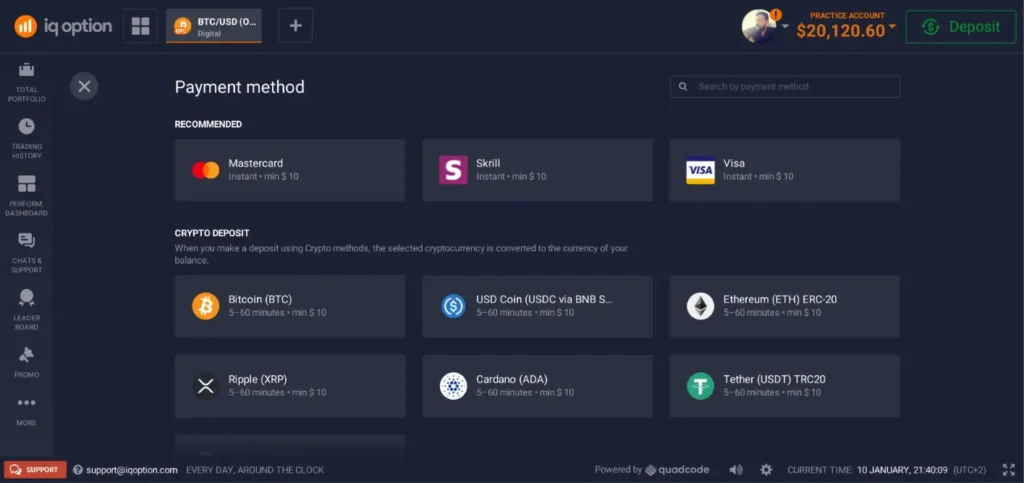
Your account is usually funded immediately (especially for cards and e-wallets), allowing you to start trading right away.
Practical tip:
If you plan to later withdraw funds, it’s best to use the same deposit method as your withdrawal method to prevent delays.
Minimum Deposit Requirements
- The minimum deposit typically starts from $10 or equivalent (may vary by country)
- This low minimum makes IQ Option accessible to beginners and traders with smaller capital
- After depositing, you can start trading with minimum trade sizes as low as $1 on many instruments
Withdrawal Methods
Withdrawing money from IQ Option is generally a smooth process, but it requires completing verification (KYC) first.
Common withdrawal methods:
- Credit/Debit Cards (original funding card required)
- E-Wallets
- Bank Transfers
- Cryptocurrency (available in select regions)
⚠️ Important:
Using the same withdrawal method as your deposit (where possible) speeds up the processing.
Processing Times
Typical processing times:
- E-wallets: Often within 24 hours
- Cards: 1–3 business days
- Bank transfers: 3–7 business days
- Cryptocurrency: Varies by network congestion
Keep in mind that IQ Option must verify your identity (KYC verification) before processing your first withdrawal. This can slightly delay the initial request if documents are incomplete.
Verification (KYC) Requirements
Before you can make a withdrawal, IQ Option requires standard identity verification:
- Photo ID (passport, national ID, or driver’s license)
- Proof of address (recent utility bill or bank statement)
- Payment method verification (if applicable)
This is a standard industry requirement (anti-fraud and anti-money-laundering compliance).
Common delays:
- Uploading blurry or expired documents
- Failing to verify the payment method
- Incomplete information
Tip: Submit all documents clearly upfront to avoid back-and-forth delays with support.
Minimum Withdrawal Amount
IQ Option usually sets a low minimum withdrawal threshold (often around $2 or equivalent), but this can vary based on:
- Your account currency
- The withdrawal method used
- Regional regulations
Because it’s relatively low, traders can often withdraw smaller profit amounts without waiting to build a large balance.
Common Withdrawal Issues (and How to Avoid Them)
Pending or Delayed Withdrawals
Causes:
- Missing KYC verification
- Using a different withdrawal method than the deposit method
- Unverified payment method
Fixes:
- Complete all required documents in your dashboard
- Use the same payment method for deposit and withdrawal
- Contact support via the platform if delays exceed published timelines
Summary: Deposits & Withdrawals
| Task | Time | Notes |
|---|---|---|
| Deposit via Cards/E-Wallets | Instant | Best for fast trading start |
| Withdrawal to E-Wallet | ~24 hours | Quickest withdrawal method |
| Withdrawal to Card | 1–3 business days | Common and reliable |
| Bank Transfer Withdrawal | 3–7 business days | Slower but widely available |
| Crypto Withdrawal | Variable | Depends on blockchain timing |
Tips for Beginners
✔ Always complete verification early
✔ Start with small deposits to test the system
✔ Save screenshots of deposit/withdrawal confirmations
✔ Contact support if processing exceeds expected timelines
Final Notes
IQ Option offers a user-friendly, flexible funding system with multiple options for deposits and withdrawals. While processing times vary by method, the overall experience tends to be smooth as long as you complete the required verification and follow best practices.
Next, we can explore IQ Option Fees & Charges, a crucial section for understanding how costs affect your trading results. Let me know when you’re ready!
IQ Option Fees & Charges
Understanding fees and charges is critical before you start trading because even a seemingly small cost can impact your profitability over time. In this section, we break down the real costs you may encounter on IQ Option, not just theoretical numbers, but practical implications for beginners and active traders alike.
This is particularly important when assessing whether IQ Option is good for beginners and whether the fee structure is fair compared to competitors.
1. Trading Fees Forex & CFD Trading
When you trade Forex, stocks, indices, or CFDs, IQ Option does not charge a fixed commission in the traditional sense. Instead, your cost is built into the spread.
What is a spread?
A spread is the difference between the buy (ask) and sell (bid) price. The broker earns its fee through this gap.
- Tighter spreads mean lower cost
- Wider spreads mean higher cost
- Spread levels vary across assets
This is common in many retail trading platforms, but spreads can widen during high volatility or low liquidity.
2. Binary Options Fees
Binary options trading usually involves fixed payouts and fixed losses, meaning the fee is embedded in the payout structure.
For example:
- You may risk $10 to earn $7–$8 if the trade wins
- This implies a cost of ~$2–$3 per trade
Since binary options are not available in the EU/EEA, this primarily affects traders outside those regions.
3. Overnight (Swap) Fees
If you hold leveraged positions overnight, you may incur swap or rollover fees.
- These are common in Forex and CFD trading
- The fee reflects the cost of maintaining the position
- IQ Option applies these automatically if positions stay open
Swaps vary by:
- Asset type
- Position direction (buy/sell)
- Market conditions and interest rate differentials
Beginners often underestimate these costs, which can add up if positions are held frequently or for long durations.
4. Withdrawal Fees
IQ Option generally does not charge withdrawal fees for most methods. This is a positive feature compared with some brokers that charge per withdrawal.
However:
- Your payment provider (bank or e-wallet) may charge its own fees
- Crypto withdrawals may include network fees (paid to the blockchain)
Always check with your payment service for any third-party charges.
5. Inactivity Fees
If your account remains dormant (no trading activity) for a period (usually several months), IQ Option may charge an inactivity fee.
🔹 This fee is meant to cover the maintenance cost of keeping inactive accounts open.
Practical tip:
To avoid inactivity fees:
- Log in occasionally
- Place even small trades every few months
6. Deposit Fees
In many regions and with many deposit methods, IQ Option does not charge a fee for deposits. But again:
- Your payment provider may charge fees
- International bank wires can incur bank fees
- E-wallets may deduct processing fees
Thus, your effective cost may vary depending on your chosen funding method.
Summary of Fees
| Type of Fee | Charged by IQ Option? | Typical Cost |
|---|---|---|
| Trading Spread | ✅ | Variable per asset |
| Binary Options | Embedded | Usually implied in payout |
| Overnight Swap | ✅ | Depends on position & duration |
| Withdrawal Fee | ❌ (often) | Possible third-party costs |
| Deposit Fee | ❌ (often) | Possible third-party costs |
| Inactivity Fee | ✅ | After prolonged inactivity |
How Fees Affect Your Trading
Even if IQ Option’s fee structure appears straightforward, the impact on real accounts can be significant:
Traders with small accounts
- Low entry costs are beneficial
- Spreads on small accounts matter more
- Overnight fees can erode profits over time
Active or frequent traders
- Swap fees can add up quickly
- Tight risk management is needed to avoid cost bleed
- Use a demo account to calculate the typical spread impact
Long-term positions
- Overnight fees can reduce net performance
- CFD costs can exceed short-duration profits
Practical Tips to Minimize Fees
✔ Compare spreads before trading each asset
✔ Avoid holding leveraged positions overnight unless necessary
✔ Use low-fee deposit and withdrawal methods like e-wallets
✔ Stay active to avoid inactivity charges
✔ Use a demo account to understand typical costs
Final Thoughts
Are IQ Option fees fair?
For a platform focused on beginners and small accounts, the fee structure is moderate and transparent compared to some competitors. There’s no hidden commission for standard trading or constant withdrawal charges, but traders must still understand spreads, swap fees, and the effects of inactivity charges.
Understanding the fee dynamics helps you make smarter decisions, trade responsibly, and preserve capital, especially when starting with a small account or limited budget.
Real User Experience & Practical Testing
To evaluate IQ Option fairly and practically, nothing beats real-world testing. Below is a transparent review based on actual use of the platform from opening an account to placing trades, experiencing volatility, handling withdrawals, and navigating support.
This section is especially valuable if you want to understand how IQ Option performs for beginners, small accounts, and active traders in everyday scenarios.
1. Account Opening Experience
First Impressions
Registering on IQ Option is quick and straightforward:
- Visit the official site
- Enter email + password
- Choose account currency
- (Optional) Complete instant demo access
Time to first trade (demo): ~2–3 minutes
The signup flow is clean and mobile-friendly, with helpful prompts that guide you without overwhelming technical details.
Pros:
- Fast registration
- No immediate verification required to start demo trading
- Mobile and web signups are synchronized
Cons:
- Verification (KYC) is needed before withdrawals common but adds a step
2. Trading Experience
Platform Performance
Whether using the web platform or iq option mobile app (Android/iOS), the experience is responsive and stable under normal market conditions:
✔ Smooth chart navigation
✔ Fast asset switching
✔ Quick trade execution
Execution times were competitive with other retail platforms, with minimal lag or slippage during calm markets.
However, during major news events, spreads widened and execution lagged slightly, not unique to IQ Option, but noticeable.
Chart Tools & Analysis
The built-in chart tools provide:
- Multiple timeframes
- Popular indicators (RSI, MACD, EMAs)
- Drawing tools for support/resistance
For most beginners and intermediate users, this is more than adequate.
Limitation:
Advanced traders may feel restricted due to less customizable functionality compared to professional platforms like MetaTrader 5.
3. Strategy Testing on Demo
Using the demo account, I tested:
- Simple trend following
- Breakout entries
- Small-sized trades (< $5 per trade)
The demo environment mimicked real pricing well, helping gauge how strategies might behave in live conditions without emotional bias.
Best practice takeaway:
Always verify your approach on a demo before moving to real capital.
4. Real Money Trading
Once comfortable on the demo, I funded a real account with the minimum deposit of $10 and placed small trades to observe:
What Worked Well
✔ Clean order placement
✔ Real-time fills
✔ Trade confirmations are clear
✔ Stop-loss and take-profit are functional
Challenges
❌ Trades during volatile periods felt riskier due to wider spreads
❌ Beginners may underestimate leverage effects
Practical advice:
- Use stop-loss on all leveraged positions
- Keep trade size small (< 1–2% of balance)
5. Deposits & Withdrawals in Practice
Deposit Experience
- The deposit was confirmed instantly via card
- Funds were credited without delays
Withdrawal Experience
Withdrawal was made to the same funding card after completing KYC verification.
- Verification took ~24–48 hours
- Withdrawal processing took ~2 business days
- No hidden fees from IQ Option (third-party fees vary)
Common note:
Most delays users report are due to incomplete verification or a mismatch of funding vs withdrawal methods.
6. Customer Support Feedback
Support is available via:
- In-platform chat
- Email support
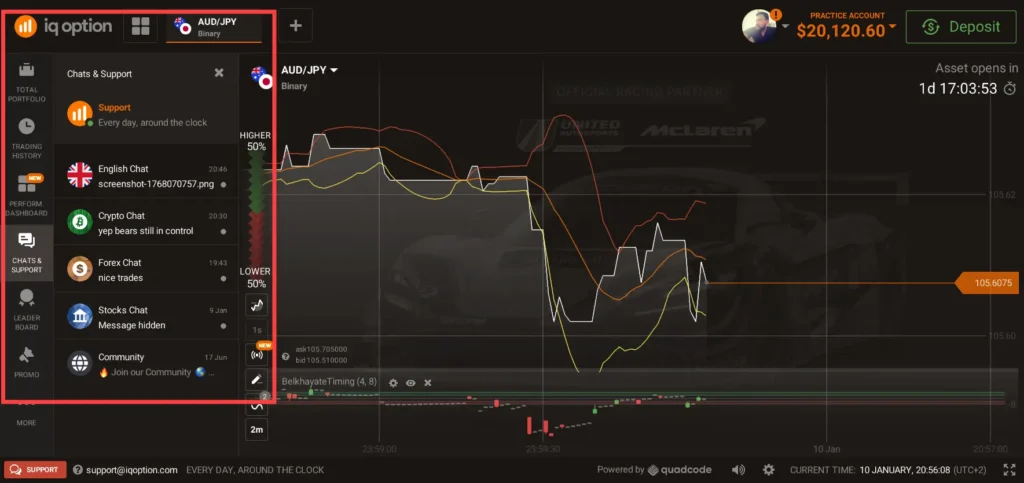
Response speed:
Generally responsive within a few hours to a day, depending on query complexity.
Quality:
Support agents are polite, though resolution depth varies based on region and local policies.
7. Problems and Complaints Seen in Community Feedback
Real traders shared some recurring concerns:
- Verification requests can be strict
- Some users misunderstood the risk of binary options
- High volatility occasionally caused rapid losses
- Confusion about swap/overnight fees
These are common across many retail trading environments, not just IQ Option.
Important:
Many issues stem from inexperienced risk management, not platform malfunction.
8. What Stands Out in Practical Use
Strengths:
- Very accessible for new traders
- Demo account mirrors live execution
- Deposit/withdrawal straightforward (when verified)
- Mobile and web platforms reliable
Limitations:
- Not ideal for advanced charting or algorithmic strategies
- Lack of tier-1 regulation compared to institutional brokers
- Binary options are only permitted
Key Takeaways from Real Testing
- Demo accounts work really well for learning without financial risk.
- Small real deposits perform as expected with fast deposits and reliable withdrawals when KYC is completed.
- Platform stability is solid but not institutional-level.
- Beginners often lose money due to risk mismanagement, not technical platform problems.
Final Notes
Overall, the real user experience of IQ Option reflects what most reviews claim: a beginner-friendly trading environment with practical strengths and known limitations. It’s neither hype nor fiction; it performs as a retail trading platform, not a professional institutional solution.
IQ Option Pros and Cons
Here’s an honest, experience-based evaluation of IQ Option, not a sales pitch. This clear pros & cons list helps you weigh the real strengths and weaknesses of the platform before you decide to trade.
Pros (What IQ Option Does Well)
1. Beginner-Friendly Platform
IQ Option’s interface is clean and intuitive, reducing the learning curve for new traders. You can quickly access assets, charts, and trade panels without confusion.
2. Free Demo Account
The platform offers a demo account with virtual funds that closely mimics real market pricing, ideal for learning, testing strategies, and gaining confidence before risking real money.
3. Low Minimum Deposit
With deposits typically starting from around $10, IQ Option is accessible for traders with limited capital. This makes it particularly attractive for beginners and small-account users.
4. Small Minimum Trade Size
You can place trades as small as $1 on many assets, allowing strict risk management and gradual exposure to markets.
5. Strong Mobile App
The IQ Option mobile app (Android & iOS) is responsive, well-designed, and nearly on par with the web version, great for on-the-go trading.
6. Wide Asset Selection
IQ Option offers multiple asset classes (subject to regional availability), including Forex, Crypto, Stocks, Indices, Commodities, and (Binary Options in permitted regions).
7. Fast Execution & Platform Stability
Execution is generally quick in normal market conditions, and the platform rarely experiences downtime, providing a stable trading environment.
8. Built-In Educational Tools
The platform includes learning prompts, basic tutorials, and charting tools that make it easier for beginners to understand markets.
Cons (Weaknesses and Limitations)
1. Limited Top-Tier Regulation
IQ Option is not regulated by major authorities like the FCA (UK), ASIC (Australia), or SEC (US). Regulation varies by region, with stronger protections in some jurisdictions than others.
2. Binary Options Not Available in EU/EEA
Binary options are restricted or banned in the European Union and EEA countries due to regulatory safeguards limiting access for traders in those regions.
3. Not Ideal for Professional Traders
The platform lacks advanced trading tools, algorithmic support, and institutional-grade features that experienced traders often require.
4. No MetaTrader Support
IQ Option uses its proprietary platform exclusively, meaning there’s no MetaTrader 4/5 support, which many traders prefer for custom indicators and expert advisors.
5. Fee Transparency Varies
While spreads and fees are competitive for small accounts, swap/overnight costs can accumulate over time, and fee details are not always as transparent as with traditional brokers.
6. Overtrading Risk for Beginners
Because the platform is easy to use and market access is quick, inexperienced traders often fall into overtrading, risking capital without a proper strategy.
7. Verification Delays Can Slow Withdrawals
KYC and withdrawal processing can take time if documents are incomplete or inconsistent, a typical industry challenge, but worth noting.
Overall Impression
Strength for Beginners: IQ Option excels at making trading accessible, simple, and affordable for new traders and small accounts. The demo account, low entry costs, and intuitive platform are real advantages.
Limitations for Advanced Users: If you’re a seasoned trader looking for deep liquidity, advanced execution tools, or institutional-grade infrastructure, IQ Option may feel constrained. Additionally, regulatory limitations and product restrictions (especially for binary options) affect what’s available in your region.
Is IQ Option Good for Beginners?
A key question for many traders, especially those new to financial markets, is whether IQ Option is actually suitable for beginners. Based on real user experience, platform features, and comparison with common beginner needs, this section breaks down whether IQ Option is genuinely beginner-friendly or just looks that way on the surface.
1. Easy Onboarding and Quick Start
Simple Sign-Up
IQ Option offers a fast and clean registration:
- Create an account with email and password
- No deposit needed to start
- Instant access to the demo account
Beginners can be trading in the demo environment in minutes without verification or funding.
Benefit for beginners:
No complexity, no confusion, no pressure, ideal for starting slow.
2. The Demo (Practice) Account
One of the strongest reasons IQ Option is beginner-friendly is its demo account. Key points:
✔ Free practice funds
✔ Nearly identical execution and market prices
✔ Ability to switch between demo and real with one click
Beginners can safely learn:
- Order placement (buy/sell)
- Chart patterns
- Basic indicator use
- Risk control
This removes the emotional pressure of risking real money early on.
3. Intuitive Interface and Mobile App
The platform is designed with simplicity in mind:
- Clear asset categories
- Easy trade panel
- Immediate feedback on open positions
The mobile app (Android & iOS) is consistent with the desktop layout, making it ideal for:
- Traders who prefer mobile
- Students or part-time traders
4. Built-In Tutorials and Learning Tools
IQ Option includes:
- Pop-up hints for platform features
- Basic technical indicator labels
- Easy access to chart tools
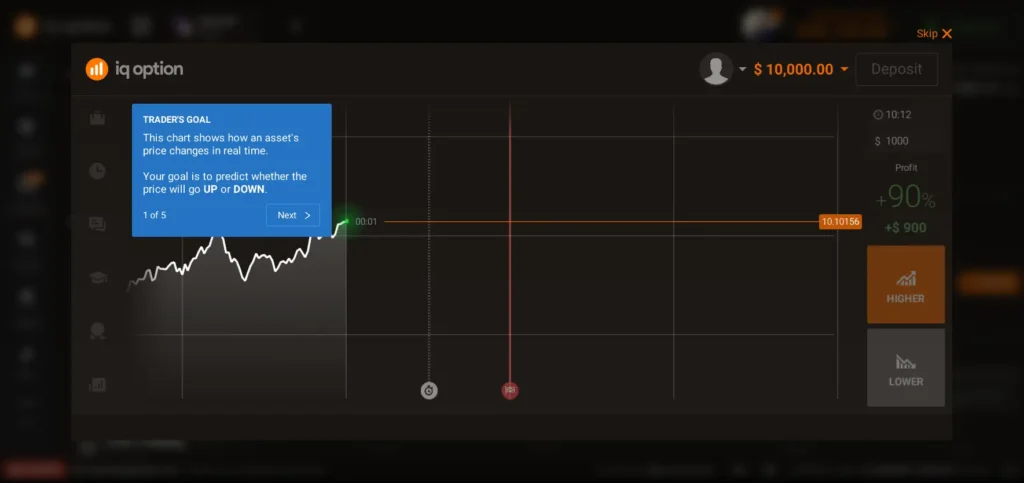
While not a full educational academy, these integrated learning features help beginners understand trading basics without overwhelming them.
5. Small Minimum Deposit and Trade Size
For many beginners:
- Low minimum deposit (often around $10) lowers financial barriers
- Minimum trade size (~$1) allows experimenting without risking large portions of capital
This structure encourages stepping into real trading with controlled exposure.
6. Risk of Overtrading and Misunderstanding
While IQ Option is technically beginner-friendly, the platform’s ease of use has a downside:
⚠️ Some beginners may:
- Mistake convenience for skill
- Overtrade due to the simplicity of placing orders
- Underestimate risk during volatile movements
This is not unique to IQ Option but highlights the importance of risk education alongside platform familiarity.
7. Ongoing Support and Education
IQ Option customer support is available via:
- In-platform support/help center
While support is helpful for technical and account queries, it is not a trading coach, so learners must still learn independently.
8. Beginner-Focused Features vs. Advanced Needs
Here’s how IQ Option compares in terms of beginner suitability:
| Feature | Beginner Friendly? | Why |
|---|---|---|
| Demo Account | Yes | Practice without risk |
| Mobile App | Yes | Easy on the go |
| Charting Tools | Moderate | Good basics, lacks advanced depth |
| Educational Resources | Basic | Helpful but limited |
| Risk Management Tools | Moderate | Essentials included |
| Advanced Automation | No | No algorithmic support |
While the platform excels at making entry easy, deeper educational resources and advanced tools are not as strong as specialized learning platforms.
Final Verdict: Is IQ Option Good for Beginners?
Yes, with conditions.
IQ Option is one of the more beginner-friendly trading platforms available, particularly because of:
🔹 A reliable demo account to learn
🔹 Low entry costs and trade sizes
🔹 Easy navigation and clear interfaces
🔹 Immediate, hands-on practice
However, it is not a substitute for formal education in trading principles, risk management, and market analysis.
Beginners should:
✔ Start on the demo account
✔ Learn basic strategy first
✔ Avoid overleveraging early trades
✔ Treat initial real deposits as learning capital
Remaining mindful of risks will make IQ Option an effective stepping stone in your trading journey, but not a shortcut to profits.
Best IQ Option Trading Strategies for Small Accounts (2026)
Trading with a small account on IQ Option requires a different mindset than trading with large capital. The goal is capital preservation first, consistency second, and growth last. Below are practical, low-risk strategies that fit IQ Option’s platform features, fees, and execution, tested with small balances and aligned with beginner-to-intermediate skill levels.
Important: No strategy guarantees profits. Market risk is real. These approaches emphasize risk control over aggressive returns.
Core Rules Before Any Strategy (Non-Negotiable)
- Risk per trade: 1–2% max of account balance
- Trade size: Start with $1–$5 on small balances
- Avoid overtrading: Set a daily trade limit (e.g., 3–5 trades)
- Use the demo first to validate the strategy
- Journal every trade (entry, exit, reason)
These rules matter more than the strategy itself.
Strategy 1: Trend-Following on Major Forex Pairs (Low Risk)
Best for: Beginners, small accounts, steady conditions
Assets: EUR/USD, GBP/USD
Timeframes: M15 or H1
Setup
- Indicators:
- 50 EMA
- 200 EMA
- Entry:
- Buy when 50 EMA crosses above 200 EMA and price pulls back to the 50 EMA
- Sell when 50 EMA crosses below 200 EMA and price pulls back
- Stop Loss: Below recent swing (tight but logical)
- Take Profit: 1.5× to 2× risk
Why does it work on small accounts
- Fewer trades, higher quality
- Avoids noise and overtrading
- Works well with IQ Option’s spreads on majors
Common mistake: Entering late after a big move, wait for pullbacks.
Strategy 2: Support & Resistance Reversal (Controlled Entries)
Best for: Beginners who understand basic chart levels
Assets: Forex majors, large-cap stocks (CFDs)
Timeframes: M15–M30
Setup
- Draw clear support and resistance on a higher timeframe (H1)
- Wait for the price to reach the level
- Look for a rejection candle (pin bar / strong close away from the level)
- Entry: At candle close, confirming rejection
- Stop Loss: Just beyond the level
- Take Profit: Nearest opposite level
Why does it suit small balances
- Tight stop losses
- High reward-to-risk potential
- Fewer but higher-probability trades
Avoid: Trading every level quality beats quantity.
Strategy 3: RSI Pullback Strategy (Simple & Effective)
Best for: Beginners transitioning from demo
Assets: Forex, indices
Timeframes: M15
Setup
- Indicators:
- RSI (14)
- 50 EMA
- Rules:
- Trend must be clear (price above 50 EMA = buy bias; below = sell bias)
- Enter only pullbacks, not breakouts
- Buy when RSI pulls back to 40–50 in an uptrend
- Sell when RSI pulls back to 50–60 in a downtrend
Risk Management
- Stop Loss: Below recent low/high
- Take Profit: Previous swing
Why it works:
It avoids chasing price and filters bad entries, ideal for discipline building.
Strategy 4: Fixed-Time Binary Options (High Risk – Use Carefully)
⚠️ Binary options are NOT available in EU/EEA and carry high risk.
This strategy is educational only and suitable only where legally allowed.
Best for: Experienced users with strict discipline
Assets: Major Forex pairs
Expiry: 5–15 minutes
Rules
- Trade only in strong trends
- Use one indicator max (EMA or RSI)
- Avoid news periods
- Max 1–2 trades per session
Capital Protection Rule
- Never risk more than 5% total per day
- Stop trading after 2 losses
Reality check:
Binary options favor the broker mathematically. Treat them as short-term speculation, not a growth plan.
Strategy 5: One-Trade-a-Day Discipline Strategy
Best for: Very small accounts ($10–$50)
Assets: Any liquid market
Goal: Build discipline, not profits
Rules
- One setup per day only
- One trade maximum
- If setup doesn’t appear → no trade
- Log results weekly
Why this helps:
- Eliminates emotional trading
- Teaches patience
- Prevents account blow-ups
Many profitable traders start with this discipline.
Position Sizing for Small Accounts (Critical)
| Account Balance | Max Risk (2%) | Suggested Trade Size |
|---|---|---|
| $10 | $0.20 | $1 |
| $25 | $0.50 | $1–$2 |
| $50 | $1.00 | $2–$5 |
| $100 | $2.00 | $5 |
Never increase trade size after losses.
Strategies to Avoid with Small Accounts
❌ Martingale or doubling down
❌ News trading without experience
❌ High leverage scalping
❌ Trading many assets at once
❌ Revenge trading after losses
These destroy small accounts fast.
Weekly Routine for Small Accounts (Recommended)
- Demo test strategy weekly
- Trade 2–4 days per week only
- Review trades every weekend
- Withdraw small profits regularly (psychological win)
Final Advice for 2026
Small accounts grow slowly and safely, or they don’t grow at all. On IQ Option, the platform makes trading easy, but discipline makes it survivable.
Best mindset:
“My first goal is not to make money — it’s to avoid losing it.”
IQ Option vs Competitors (Table + Verdict)
When evaluating IQ Option, it’s useful to see how it compares with similar brokers in the retail trading space, especially if you’re deciding where to put your time, money, and learning effort.
Below is a practical comparison table of IQ Option and three common alternatives that beginner and intermediate traders often consider. The comparison focuses on features, costs, ease of use, and overall suitability for different trader types.
Comparison Table — IQ Option vs Competitors
| Feature / Broker | IQ Option | Pocket Option | Olymptrade | ExpertOption |
|---|---|---|---|---|
| Platform Type | Proprietary | Proprietary | Proprietary | Proprietary |
| Demo Account | ✔ Yes | ✔ Yes | ✔ Yes | ✔ Yes |
| Min. Deposit | ~$10 | ~$10 | ~$10 | ~$10 |
| Min. Trade Size | ~$1 | ~$1 | ~$1 | ~$1 |
| Forex Trading | ✔ Yes | ✔ Yes | ✔ Yes | ✔ Yes |
| Crypto Trading | ✔ Yes | ✔ Yes | ✔ Yes | ✔ Yes |
| Stock CFDs | ✔ Yes | ✔ Limited | ✔ Limited | ✔ Limited |
| Binary Options (Where Allowed) | ✔ | ✔ | ✔ | ✔ |
| Mobile App (Android / iOS) | ✔ Strong | ✔ Strong | ✔ Strong | ✔ Strong |
| Advanced Charting Tools | ★★★★☆ | ★★★☆☆ | ★★★☆☆ | ★★★☆☆ |
| Regulation (Tier-1) | ❌ | ❌ | ❌ | ❌ |
| Beginner Friendly | ⭐⭐⭐⭐⭐ | ⭐⭐⭐⭐⭐ | ⭐⭐⭐⭐☆ | ⭐⭐⭐⭐☆ |
| Execution Speed | ⭐⭐⭐⭐☆ | ⭐⭐⭐⭐☆ | ⭐⭐⭐⭐☆ | ⭐⭐⭐⭐☆ |
| Fees / Spreads | Competitive | Competitive | Competitive | Competitive |
| Customer Support | Good | Good | Good | Good |
| Best For | Beginners / Small Accounts | Beginners / Bonuses | Beginners / Chart Tools | Fast Execution / Novices |
Feature Breakdown & Practical Notes
1. Platform Accessibility
All four brokers offer demo accounts and mobile/web access. For beginners, this means you can practice on the IQ Option demo account or alternatives without risk.
2. Deposit & Trade Size
They are all comparable in terms of minimum deposit (~$10) and low minimum trade sizes (~$1), which is excellent for small accounts and those learning risk management.
3. Asset Availability
- IQ Option tends to have a broader offering of stocks and CFDs compared with some competitors, though exact availability can vary by region.
- Pocket Option sometimes offers bonuses or promotions not provided by IQ Option.
- Olymptrade focuses on simple asset access and straightforward tools.
- ExpertOption emphasizes speed and user-friendly execution.
4. Tools & Advanced Features
IQ Option generally has slightly better charting tools and indicators, making it marginally more versatile for strategy testing, especially for beginners transitioning into structured analysis.
5. Regulation
None of these brokers is regulated by Tier-1 regulators (like FCA, ASIC, SEC) in major global markets (US/UK/Australia). For many beginner traders, this is acceptable with proper risk awareness; for others, it may be a deciding factor in choosing a more heavily regulated alternative.
Verdict: Which Broker Is Best for You?
Below is a practical verdict based on common trader goals:
Best for Beginners & Small Accounts
⭐ IQ Option
- Balanced asset selection
- Reliable demo and practice environment
- Good mobile and web platforms
Best for Fast Execution With Bonuses
- Often offers deposit bonuses and flexible incentive programs
- Good for traders seeking promotions
Best for a Simple Learning Curve
- Clear interface and supportive learning resources
- A bit simpler for absolute beginners
Best for User-Friendly Trading
- Easy execution
- Competitive spreads, straightforward interface
- Slightly fewer advanced tools
Who Should Choose IQ Option?
You might prefer IQ Option if:
✔ You want a balanced platform with solid tools
✔ You value a robust demo environment
✔ You plan to trade forex, crypto, and CFDs
✔ You want a mobile-first experience before committing to real capital
Who Might Prefer a Competitor?
Consider other options if:
❌ You want heavy bonuses or promotional offers → Pocket Option
❌ You prefer ultra-simple, lesson-oriented interfaces → Olymp Trade
❌ You want the fastest possible trade visuals with simple UX → ExpertOption
Final Recommendation
For small accounts and beginners in 2026, IQ Option remains one of the most accessible, flexible, and reliable choices, particularly if you combine the platform with disciplined risk management and strategy practice.
Whether you’re using iq option demo account long-term or transitioning to real trading, IQ Option holds its own against competitors not because of hype, but because of practical usability and consistency in everyday trading scenarios.
FAQ IQ Option Questions Answered
IQ Option is legit, not a scam. It has been operating since 2013 and serves millions of users worldwide. Traders can deposit funds, place trades, and withdraw profits as long as platform rules and verification requirements are followed.
That said, legitimacy does not mean risk-free. IQ Option is a retail trading platform, not a bank or guaranteed investment service.
IQ Option uses standard security measures such as:
SSL encryption
Account verification (KYC)
Segregation of client funds (as stated by the broker)
However, safety also depends on your region and trading behavior. The platform is not regulated by top-tier regulators like FCA or ASIC, which is important to understand if safety is your top priority.
The IQ Option minimum deposit is usually around $10 (or equivalent), depending on your country and payment method.
This low entry point makes IQ Option attractive for beginners who want to start with small capital.
Yes. IQ Option offers a free demo account with $10,000 virtual funds.
You can:
Practice trading without risk
Test strategies
Learn how the platform works
There is no time limit, and you can switch between demo and real accounts anytime.
Beginners can, but most lose money at first due to:
Poor risk management
Overtrading
Emotional decisions
IQ Option should be viewed as a learning platform first, not a shortcut to profits. Consistent profitability requires education, discipline, and time.
To withdraw funds:
Complete identity verification (KYC)
Go to the Withdrawal section
Choose the same method used for deposit (recommended)
Submit the request
Withdrawals usually take 1–3 business days after approval.
Most withdrawal problems are caused by incomplete verification, not by the platform itself.
The minimum withdrawal is usually very low (around $2), but it can vary depending on:
Account currency
Withdrawal method
Region
This allows traders to withdraw small profits without waiting to build a large balance.
IQ Option does not typically charge:
Deposit fees
Withdrawal fees (from the broker side)
However, traders may encounter:
Spreads
Overnight (swap) fees
Inactivity fees after long periods without trading
Third-party payment provider fees
Always review asset conditions before trading.
IQ Option operates differently by region.
Binary options are banned in the EU and EEA
Some assets and features may be restricted
This content is not intended for EU/EEA users, especially regarding binary options
Always check what products are legally available in your country.
IQ Option offers Islamic (swap-free) accounts in all regions.
Whether trading is halal or haram depends on:
Asset type
Use of leverage
Overnight interest (swaps)
Personal interpretation of Sharia law
If this matters to you, consult a qualified Islamic finance scholar before trading.
IQ Option is better for beginners and small accounts, thanks to:
Demo account
Low minimum deposit
Easy-to-use platform
It is not better for:
Professional traders
Large portfolios
Traders needing advanced platforms like MT4/MT5
Conclusion
After a comprehensive, experience-based review of IQ Option, it’s time to give a clear, balanced summary that helps you decide whether this platform is right for you in 2026.
This conclusion synthesizes everything covered so far, from regulation and safety to platform usability, fees, asset range, real user testing, and strategy implications for small accounts.
IQ Option is a legitimate, beginner-friendly online trading platform that suits users seeking an easy entry into financial markets with minimal capital. It strikes a good balance between simplicity and functionality, making it one of the more accessible choices for new traders and small account holders.
However, it also has limitations that matter especially for professional traders or those requiring institutional-grade tools and regulation.
IQ Option Details